Service · Tracking
Conversion tracking setup: know which ad earned each enquiry
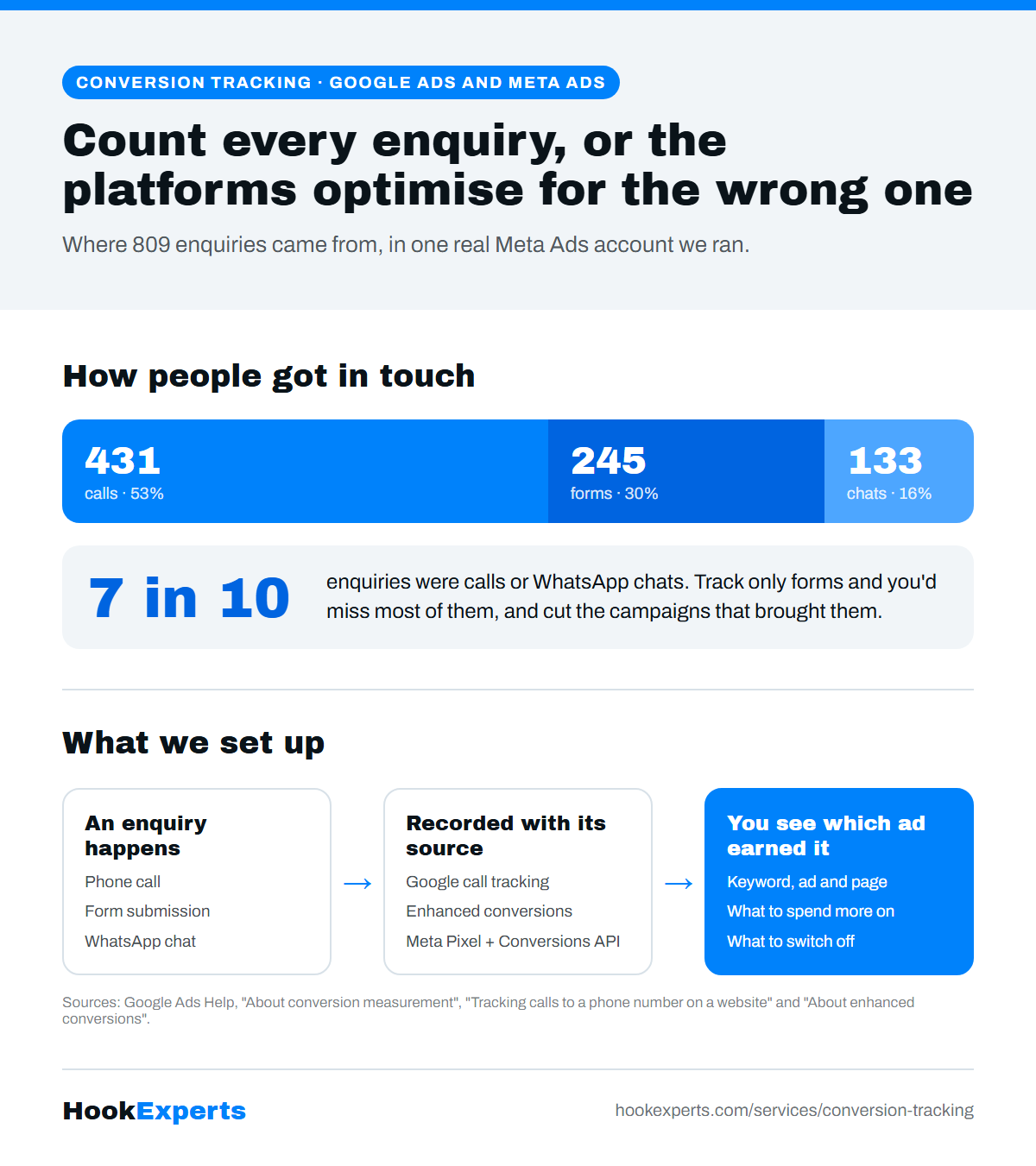
We set up conversion tracking for Google Ads and Meta Ads that counts every call, form submission and WhatsApp chat, and traces each one back to the ad and page that produced it. Then you know which campaigns to fund and which to switch off.
If you can't see which ad worked, you pay for the ones that didn't
Without tracking you can see that money came in, but not which ad brought it. So the campaigns that never earned anything keep getting paid for, right next to the one that did.
It gets worse. Google Ads and Meta both decide who sees your ads based on the results you report back. If they only see form fills and miss the calls and WhatsApp chats, they optimise for the wrong people.
Good tracking fixes both. You see what works, and so do the platforms.
What our conversion tracking setup covers
Without tracking you can see that enquiries came in, but not which ad brought them. Here is what we set up so you can.
- 1A call, form or chat
- 2Recorded with its source
- 3Sent back to the ad platform
- 4You see which ad earned it
Calls, forms and chats counted together
We count every call, form submission and message together. Count only one and you cut the channel that is actually working.
Traced to the ad and the page
Every enquiry is tracked back to the specific ad and page that produced it. You see which campaign produced which enquiry, not just a monthly summary.
Set up in Google Ads and Meta
In Google Ads you choose the actions that count, such as a purchase, sign-up or phone call. On Meta, the Meta Pixel and the Conversions API send events from your site back to Meta.
Tells you what to switch off
Without tracking, the campaigns that never earned anything keep getting paid for. With it, you see exactly what to spend more on and what to stop.
What's included in our conversion tracking setup
The exact setup depends on how your customers get in touch. These are the pieces we put in place.
Google Ads conversion tracking
Conversion actions for the enquiries that matter, so Google can show which keywords, ads, ad groups and campaigns drive them.
Call conversion tracking
Google's website call tracking with a free forwarding number, counting a call as a conversion once it passes a minimum length you set.
Enhanced conversions
Google's enhanced conversions send hashed first-party data, such as an email, to make conversion measurement more accurate, in a privacy-safe way.
Meta Pixel and Conversions API
The Pixel on the page and the Conversions API from the server, so Meta still sees enquiries when a browser blocks the Pixel.
WhatsApp conversion tracking
WhatsApp clicks and form submissions recorded with their source, so chats are counted next to calls and forms.
GA4, Search Console and Clarity
GA4 for the numbers, Search Console for organic search, and Microsoft Clarity to watch what visitors do. These accounts stay in your name.
Why conversion tracking stops working
Only counting forms
Calls and WhatsApp chats go uncounted, so the campaigns that bring them look like failures and get cut.
Counting every click as a conversion
A button click is not an enquiry. When everything counts, nothing tells you anything.
Tracking that broke and nobody noticed
A site update removes the tag, and for weeks the platforms optimise on nothing. We check that tracking still fires.
Platform and analytics disagree
Google Ads, Meta and GA4 count things differently. We set clear definitions so you know which number answers which question.
Do you need this now?
A good fit if
- You spend on Google Ads or Meta Ads and can't say which ad brought your last sale.
- Customers call or message on WhatsApp as often as they fill forms.
- You want to use Google's Smart Bidding, which needs conversion data.
Not a fit if
- You aren't running any ads yet. Start there.
- You only want a dashboard, not decisions based on it.
Why choose HookExperts for conversion tracking setup
One team, from ad to enquiry
Most agencies run ads and hand you a report. We run the ads, build the page people land on, and keep improving how many of them enquire. If something isn't working, it's our job to fix it.
Your accounts stay yours
Your domain, ad accounts and analytics stay in your name. You can see everything we do, and you never have to ask us for access to your own data.
Fee kept apart from ad spend
Ad spend goes to the platform. Our fee covers the work. Keeping them apart is the only way you can see what the platform took and what we did with it.
A few accounts at a time
We start at most two new accounts in the same fortnight, so a new account gets real attention in its first two weeks instead of a template.
Why tracking comes first
Google says conversion measurement shows which keywords, ads, ad groups and campaigns are best at driving valuable customer activity, and that its Smart Bidding strategies use that data to optimise. Ad platforms can only improve on enquiries they are told about.
Message us on WhatsApp and there's no cost to that first conversation. What the work itself costs depends on whether you're starting from nothing or fixing something that already runs, so there's no standard number to quote. Fees get agreed in writing before any work starts. Bring your situation to that first conversation and you'll get a real number rather than a range.
Google Ads Help: About conversion measurementHow we start
- 1
Talk on WhatsApp
It starts with a conversation about your business and where traffic and conversion stand today. There's no cost to that first conversation.
- 2
Agree it in writing
Scope and terms get agreed in writing before any work starts, based on what you actually need.
- 3
Set up tracking before spend
Calls, forms and WhatsApp chats get tracked before the budget goes live, so the first rupee you spend is already measured.
- 4
Launch, then read the numbers
Traffic starts the day campaigns go live. Knowing which work is worth the money takes longer, because you need enough data to tell a real pattern from one good week.
Find out what your tracking is missing
Tell us on WhatsApp which ad platforms you use and how customers contact you. We'll tell you which enquiries you're probably not counting.
Questions people ask
How to set up conversion tracking in Google Ads?
You choose the actions that count as a conversion, such as a purchase, sign-up or phone call, then connect where they happen: your website, calls, or an import from Google Analytics. Google's help page walks through each step. We set it up for you as part of running the account.
Google Ads Help: About conversion measurementHow to track conversions on Meta Ads?
Install the Meta Pixel on your site and send events back to Meta through the Conversions API, so Meta sees enquiries even when a browser blocks the Pixel. Calls and WhatsApp chats need their own tracking so they count too.
Is conversion tracking required for Google Ads?
Google's Smart Bidding strategies, such as Maximize Conversions and target CPA, optimise from conversion data, so they need it. For any account, without tracking you cannot tell which keyword or ad produced an enquiry.
What is the difference between Meta Pixel and Conversions API?
The Pixel runs in the visitor's browser. The Conversions API sends events from your server, so Meta still sees enquiries when a browser blocks the Pixel. Use both, and send the same event ID so Meta can remove duplicates.
Why is my Google Ads conversion tracking not working?
Usually the tag was removed in a site update, it fires on the wrong step, or the conversion action counts clicks instead of enquiries. Check that the tag still fires after every site change.
Can you track phone calls from Google Ads?
Yes. Google's website call tracking can show a free Google forwarding number on your site and count a call as a conversion once it lasts longer than a minimum length you set, so you see which keywords and ads lead to calls.
What is the conversion rate for Meta Ads?
It depends on your offer, page and city. In the one account we can show, 6.6% of clicks turned into an enquiry. Work out yours by dividing enquiries by clicks.
How to work out your own numberHow do you track whether it's actually working?
Every call, form submission and message is tracked back to the specific ad and page that produced it. You see which campaign produced which enquiry, not just a monthly summary.