Guide · Meta Ads
Meta ads strategy for ₹1,000 a day: one campaign, two ad sets
With ₹1,000 a day, one campaign with two ad sets beats five small ones. One ad set collects leads on WhatsApp, the other through an instant form, and a CRM tells Meta who became a real client. Here is every step, with screenshots and the numbers behind it.

By Aditya Shukla, Founder, HookExperts
Published

Short answer: Run one campaign with campaign budget optimisation (CBO) at ₹1,000 a day and two ad sets. Ad set A sends people to WhatsApp. Ad set B uses a higher intent instant form that ends in WhatsApp. Give each a ₹400 daily minimum, connect both to your CRM, and send the CRM’s stages back to Meta. Then leave it alone for three days.
This is the setup we use to plan a ₹1,000 a day Meta lead generation budget in India. It covers the budget, the ad sets, the form, the six ads and the tracking loop, in the order you should build them. If you want to know what leads cost before you start, read our guide to Meta Ads cost in India first.
One thing up front. The screenshots below are real. They were taken on 3 November 2026 from a draft in our second ad account, and nothing was published. The WhatsApp number is hidden. So this guide shows you a setup and its maths. It does not claim results from this exact campaign, because it has not run yet.
The budget maths
A ₹1,000 daily budget is not ₹1,000 of ad spend. GST is added, and the two minimums decide how much freedom Meta gets.
| Item | Number | What it means |
|---|---|---|
| Daily budget | ₹1,000 | The campaign budget (CBO) |
| Locked by minimums | ₹400 + ₹400 = ₹800 | Each ad set is guaranteed this much a day |
| Free for Meta to place | ₹200 | Goes to whichever ad set is doing better |
| What you really pay | about ₹1,180 a day | ₹1,000 plus 18% GST, about ₹35,400 over 30 days |
| Minimum balance | about ₹2,400 | Two days of spend. At zero, every campaign stops |
Add your GSTIN under Billing before the first top-up. The 18% GST then becomes input tax credit instead of lost money. Check the detail with your CA. Also turn on auto-recharge if your account allows it, or set a weekly reminder to look at the balance.
Why one campaign and two ad sets
The two ad sets collect leads in two different ways, and both feed the same CRM.
- WhatsApp catches people who want to talk now.
- The instant form catches people who want to think, answer a few questions and be called.
You learn which door your clients prefer, and the ₹1,000 is spread across both. In the account behind our Meta Ads cost guide, the 809 enquiries came as 431 calls, 245 forms and 133 WhatsApp chats. People use more than one door, so testing both is worth the split.
What the data says about this setup
Most “Meta ads benchmark” posts disagree with each other, so we lean on Meta’s own documents, one Meta case study and our own account. Here is what each says, and how much to trust it.
| Source | What it says | How to read it |
|---|---|---|
| Meta developer docs, Conversion Leads | Needs 200 leads a month, the stage reached within 28 days, and a stage rate between 1% and 40% | A hard rule. It decides when you can optimise for qualified leads |
| Meta case study, Lamudi (Indonesia, 16 to 30 Sep 2023) | Running click-to-WhatsApp ads next to lead ads cut cost per lead by 53% against lead ads alone | One A/B test, reported by Meta. A reason to test WhatsApp, not a promise |
| Meta developer docs, WhatsApp pricing | After a chat starts from a click-to-WhatsApp ad, Meta does not charge for marketing, utility, authentication or service messages for up to 7 days | Follow-ups inside the window are free, so reply fast |
| WordStream, 2025 benchmarks | Average Facebook lead cost about $27.66, up 21% on the year before | Mostly US data, and a cost per raw lead, not per qualified lead |
| Indian vendor blogs | Cost per lead from ₹175 (home services) to ₹900 (real estate) | No shared method. Use as a rough range only |
| Our account | ₹29.14 per enquiry, ₹16.19 per 1,000 views, 6.6% of clicks became enquiries | One account, with calls counted as enquiries. Yours will differ |
The pattern is simple. Cost per raw lead is not the number to chase. Lead quality and what happens after the lead decides whether the ads pay, which is why this strategy builds the CRM loop first.
The two lines that matter at ₹1,000 a day
Meta says an ad set needs about 50 results in a week to leave the learning phase. That gives you a ceiling on what a result can cost, for any daily budget: budget × 7 ÷ 50.
- The ₹56 line. At ₹400 a day, an ad set finishes learning in a week only if each result costs ₹56 or less. If results cost more, it may say “Learning limited”. At this budget that is expected, so read it at day 7 and do not “fix” it by editing.
- The ₹60 line. Meta lets you optimise for qualified leads once you reach 200 instant form leads a month. At the ₹400 floor, ad set B spends about ₹12,000 a month (₹400 × 30). Spread over 200 leads, that is ₹60 per lead. Cost per lead above ₹60 means ad set B will not reach 200 on its floor alone, though CBO may give it more.
Our other guides call ₹1,000 a day the floor for one ad set. This setup splits ₹1,000 in two, so each half runs under that floor. It only works while a result stays cheap. Meta’s 10 times rule says the daily budget should be at least 10 times the cost of a result, so ₹400 supports results up to ₹40. That is why this strategy optimises for conversations and leads, not purchases.
Step 1: build the tracking loop first
Tracking first, then campaign, then creative. If the loop to the CRM is not working, the ads have nothing good to learn from.
The rule is short. WhatsApp connects to the CRM, the lead form connects to the CRM, and the CRM connects to Meta through the Conversions API (CAPI). The CRM then reports each stage change, so Meta sees who became a client, not only who clicked.
- Make one dataset only for these ads. In Meta Business Settings, add a dataset, connect your ad account, and assign yourself to it with full control. A new dataset has nobody assigned, and it will not show in Ads Manager until you do.
- Start the CRM setup in Events Manager. You do not need to finish it. Starting it makes the dataset a CRM type, and only CRM-type datasets appear in an ad’s Offline events list.
- Save the Meta Lead ID in your CRM. It is a 15 to 17 digit number, and it is how Meta matches a later stage change to the original lead.
- Check WhatsApp saves the ad’s click ID. Ask your provider in writing: “Do you save the ad click ID of each WhatsApp chat, and can you send stage changes through the Conversions API?” If the answer is no, change tool before you spend.
- Keep the pipeline short. New lead, Qualified, Meeting booked, Client. Every extra stage is one more to maintain.
Do not send test leads. They sit in the dataset for good. Check by reading settings, then wait for the first real lead.
Step 2: create the campaign
Open Ads Manager and check the account name and ID first, because Meta can silently switch you to another account. Click Create and choose the objective Leads. This single objective lets you use WhatsApp in one ad set and an instant form in the other.
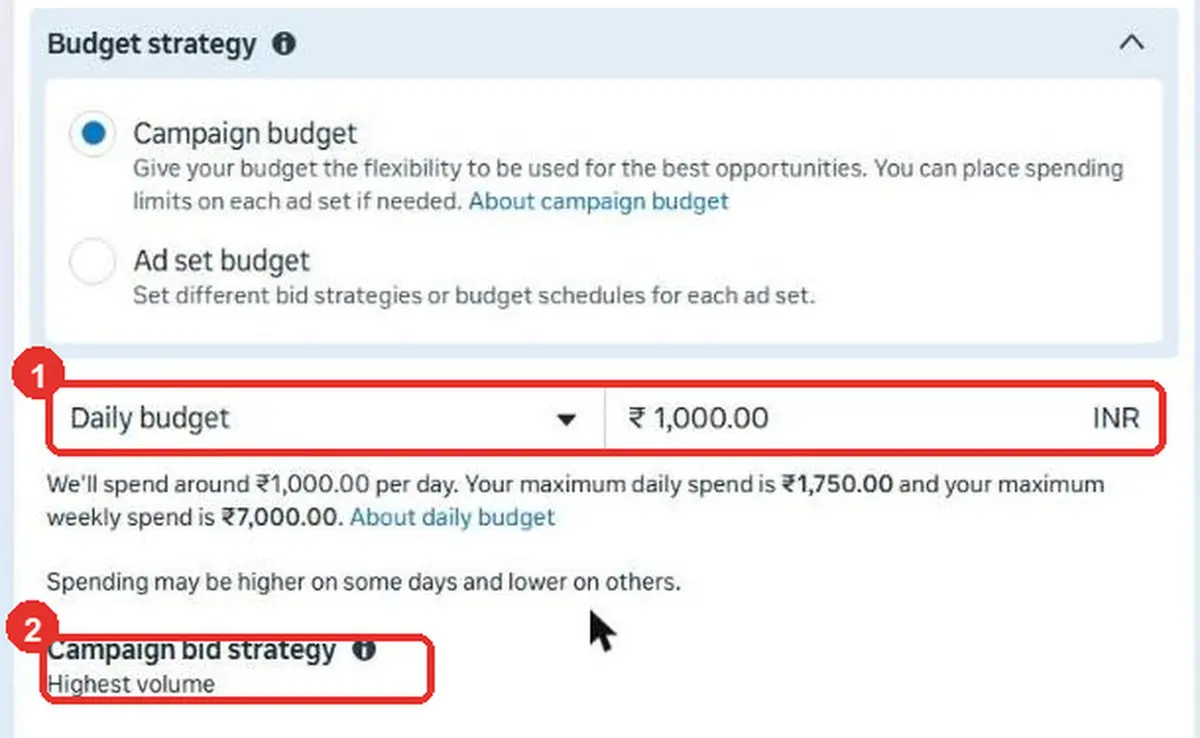
- Choose Campaign budget, not “Ad set budget”. That is CBO.
- Set a Daily budget of 1000.
- Set the bid strategy to Highest volume. Skip cost caps and bid caps at launch, because they buy two or three days of false comfort.
- Do not switch on an A/B test. This setup is already your test.
- Never set an end date. At the end date the campaign shows “Completed” while its switch still looks on.
With CBO, Meta moves the free ₹200 to the ad set finding leads more cheaply. The ₹400 minimums stop it from starving either ad set, which is what usually happens when Meta finds one early winner.
Step 3: build ad set A, the WhatsApp ad set
Name it A | WhatsApp | Broad. Open Conversion location and choose Message destinations.
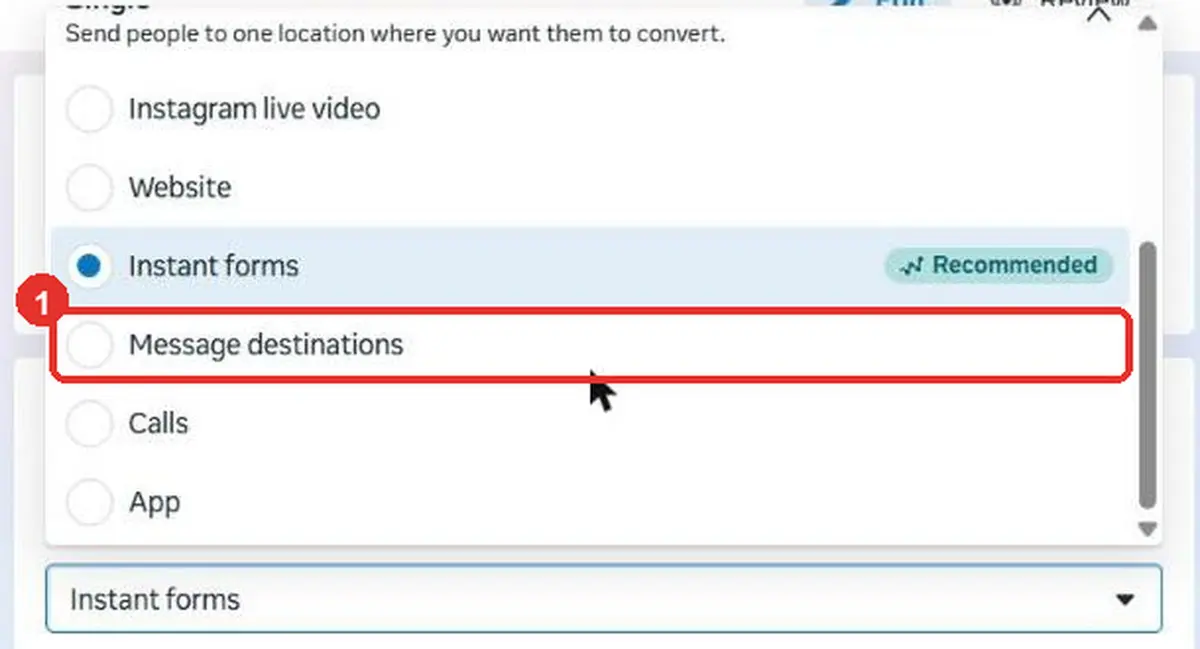
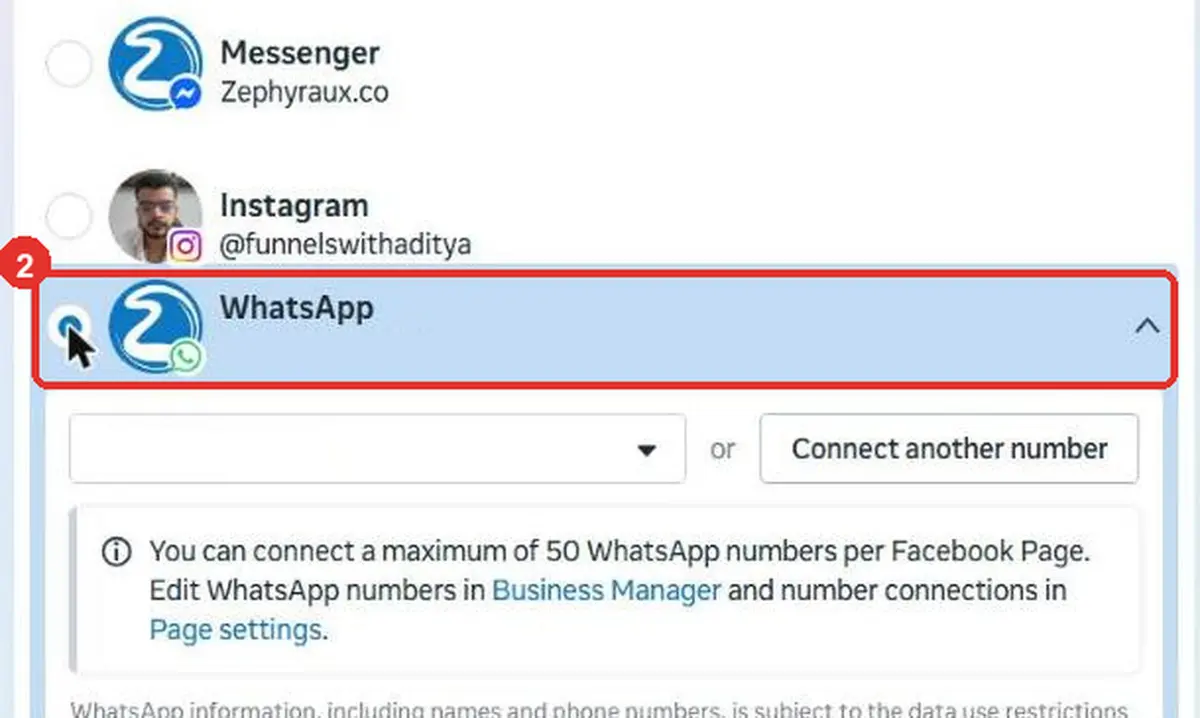
Then select WhatsApp only and pick your business number. If it is not listed, use Connect another number.
Set the performance goal to the conversations goal, such as Maximise number of conversations. Set a start date and leave the end date empty. Keep the audience broad: your country or the cities you serve, plus an age range that suits your client, with interests left empty. Keep Advantage+ placements for now and prune later, with data.
Now the setting that makes the budget split work. Under Ad set spending limits, tick the box and type 400 in Average daily minimum, the left box. Leave the maximum empty.
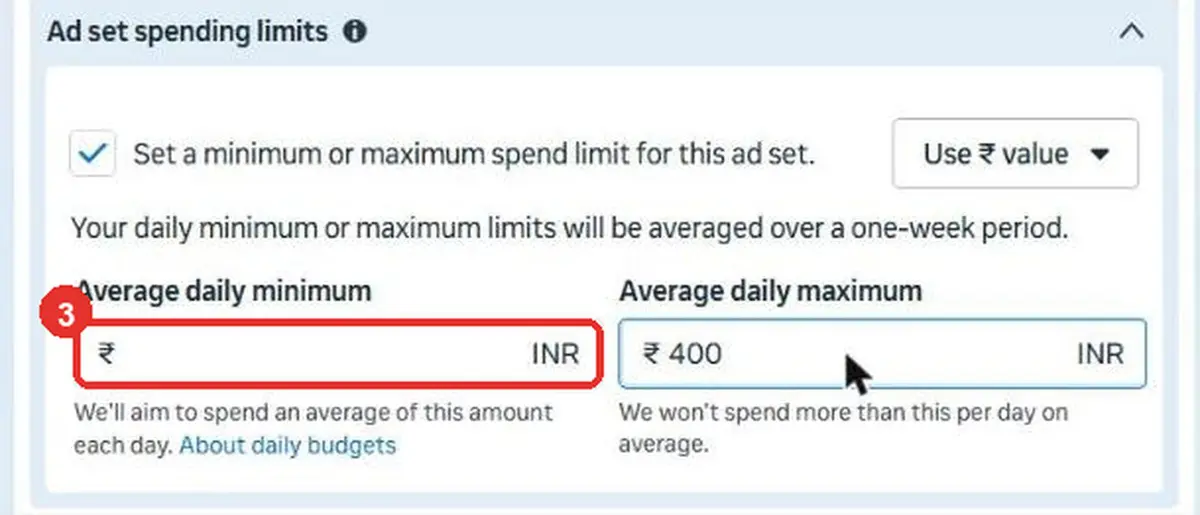
A maximum of ₹400 would cap the ad set. A minimum of ₹400 guarantees it. You want the guarantee.
Step 4: build the instant form and ad set B
Build the form once and do not edit it while it is live. If you already have a good form, duplicate it and change the copy.
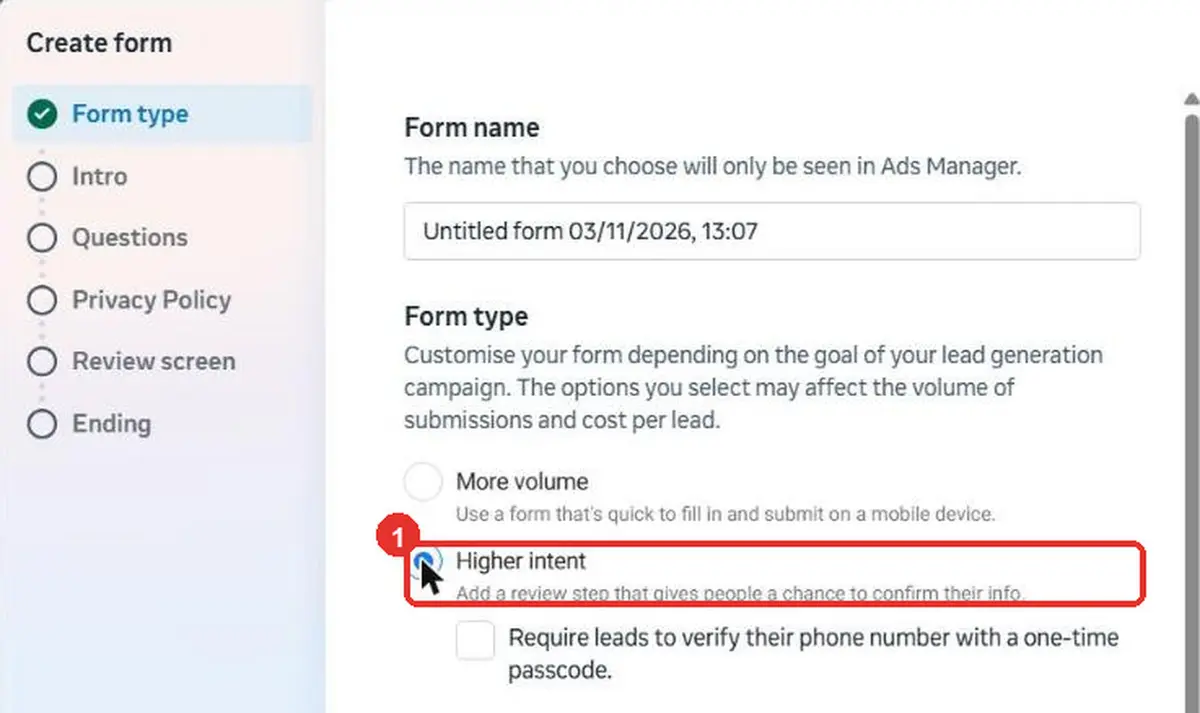
- Choose Higher intent. Leave the one-time passcode box off at first.
- Add exactly 3 multiple choice questions, with 3 or 4 plain answer options each. Good ones: what kind of business you run, your monthly ad budget, and when you want to start.
- Ask only for full name and phone number. Every extra field loses people.
- Make one question do the sorting. For example, a budget answer of “Under ₹20,000” can send the person to an end page that is not counted as a lead.
- On the Ending tab, choose Chat on WhatsApp and pick your number.
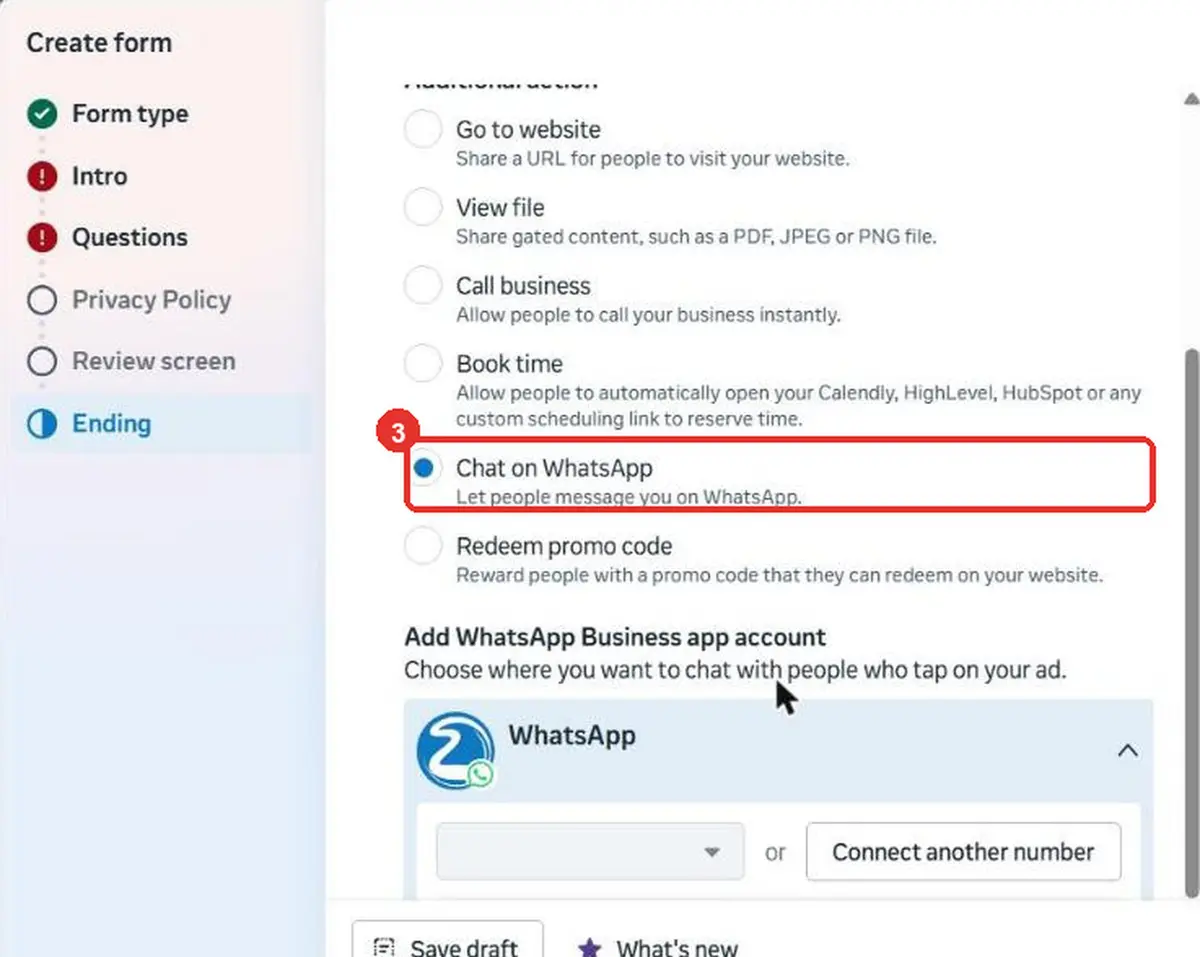
A person who just filled the form is at their warmest. Handing them to WhatsApp lets you reply in minutes instead of calling later, and the first few minutes decide it.
Now add the second ad set under the same campaign and name it B | Instant form | Broad. Set Conversion location to Instant forms and the goal to Maximise number of leads. Use the same audience, placements and start date as ad set A, and the same ₹400 daily minimum. The only difference between A and B should be the door, so the comparison stays fair.
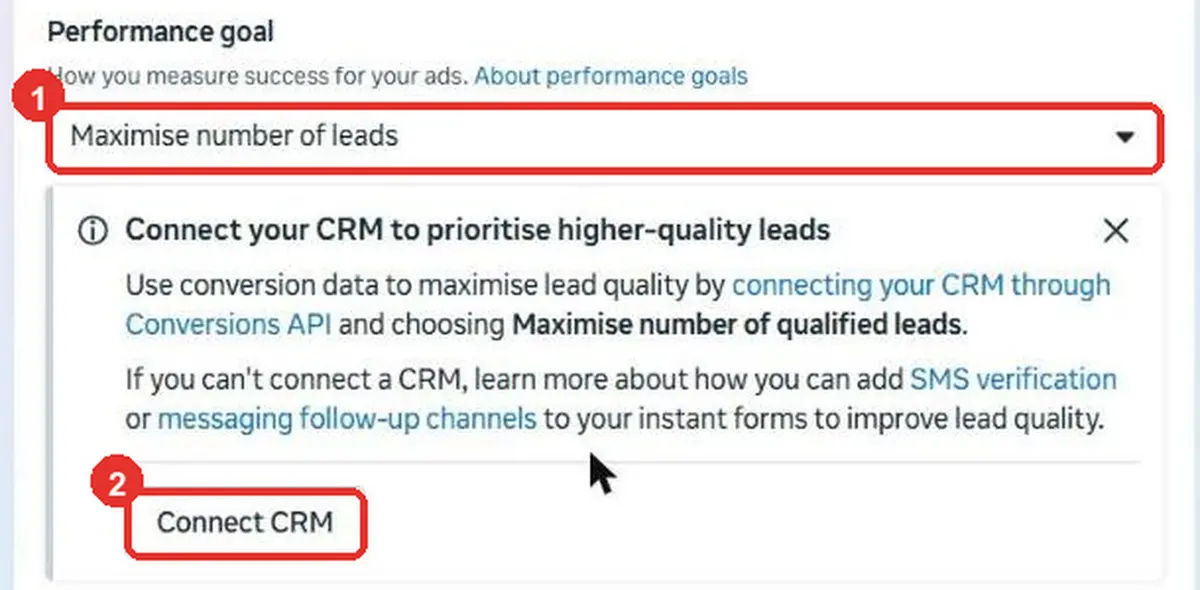
Do not optimise for qualified leads yet. Meta asks for at least 200 instant form leads a month, your CRM stage reached within 28 days, and a stage rate between 1% and 40%. Until you reach that, optimise for plain leads and let the CRM collect the data. When you do, duplicate ad set B and switch its goal. Meta locks the old goal, so duplicate and switch the old ad set off instead of deleting it.
| Ad set A | Ad set B | |
|---|---|---|
| Door | Instant form | |
| Performance goal | Maximise conversations | Maximise leads |
| Ads | 1 video + 2 static | 2 video + 1 static |
| Daily minimum | ₹400 | ₹400 |
| Audience and placements | Identical | Identical |
Step 5: make the six ads
Three ads per ad set, with the same offer and different hooks. Test hooks, not offers. If you change the hook and the offer together, you learn nothing.
- Video: 9:16 (1080 × 1920), a face to camera, with captions because many people watch on mute. Upload the file fresh. Do not boost an existing reel, since boosting can strip the voiceover.
- Static: 1:1 (1080 × 1080). One idea, one big line, one clear next step.
- Audio: your own voice or music you own. Licensed or trending audio is often blocked in ads.
- Never: arrows, cursors, play buttons, Facebook or Instagram logos, or hard income claims.
Name each ad clearly, for example A | Hook 1 | Video. The ad name travels into your CRM and tells you which creative earned each lead. Leave the Apply recommendations enhancements off, because they change what you tested.
Expect Meta to favour one ad. At a CPM of ₹120, ₹400 a day buys about 3,300 views a day (₹400 ÷ ₹120 × 1,000). Each ad wants about 8,000 views to be judged fairly, and three ads split those views, so they will not all get there in the first days. Read the ads at day 7, not day 3.
Step 6: switch on Offline events in every ad
Skip this and the whole system fails. Offline events are how the CRM’s stage changes reach the ad. If they are not selected, Meta never learns who became a client.
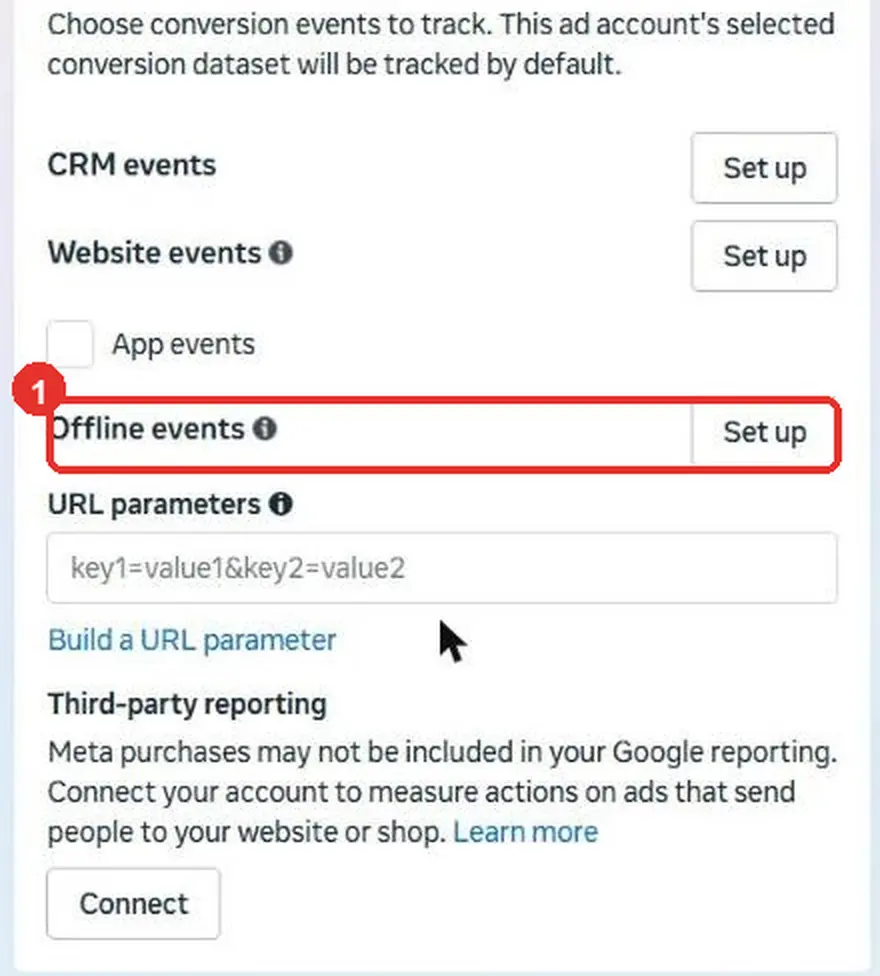
Do it in all six ads, then open each one again to confirm the tick stayed. If the dataset is missing from the list, it is almost always one of two things: you are not assigned to the dataset, or it never became a CRM type. Fix those, then reload Ads Manager.
Before you publish: four checks
Every campaign that ever broke, broke on one of these four.
- The destination works. The WhatsApp chat opens, and the form opens.
- The objective and event are right, and the event is firing.
- There is no end date anywhere.
- Offline events are ticked in all six ads.
Then press Publish yourself, after reading the review screen.
How to read it: day 1 to day 7
The first three days: hands off. Do not change the budget, audience, ads or forms. Each edit restarts learning. Spending with no clients for two or three days is normal. When you pause an ad set, Meta may offer to move its budget. Always choose Don’t update budget.
The 2-minute daily check. Same time, same order, once a day:
- Balance. Is there money in the account?
- Your CRM. How many chats and form leads came in, and how many were qualified?
- Spend. What did each ad set spend?
- Divide spend by qualified leads. That is the day’s real cost per qualified lead.
- Write it down, then close Ads Manager.
Before launch, write two numbers. The winner number is the cost per qualified lead that makes this a winner, and a common rule is to pay no more than a third of a client’s lifetime value. The dead number is about three times the winner number.
| Decision | When | What to do |
|---|---|---|
| Keep | In its first 3 days, or working | Nothing. This is the most underrated decision |
| Kill | An ad has spent about 3 times your winner number with nothing qualified, and the CRM confirms it | Switch it off. Do not delete it |
| Scale | Cost per qualified lead is under your winner number for 7 or more days | Raise the campaign budget by about 20%, wait 3 days, read again |
| Refresh | CTR falls while CPM rises, or frequency is above 2.5 on cold people | Add a new creative in a duplicate ad set, never in the live one |
Read one level down. The campaign number is an average, so open each ad set and each ad. After seven days you should know three things: which door brings cheaper qualified leads, which hook earns the most, and whether the CRM loop works.
Questions people ask
How much should I spend per day on Meta ads for lead generation?
Enough that each ad set can reach about 50 results a week. Daily budget × 7 ÷ 50 gives the most a result can cost. At ₹400 a day that is ₹56. If your results cost more than that, raise the budget or choose a cheaper result to optimise for.
Is campaign budget optimisation (CBO) good for a ₹1,000 daily budget?
Yes, with minimums. CBO lets Meta move the free ₹200 to the better ad set, and the ₹400 floor on each stops one ad set from being starved. Without the minimums, Meta often picks an early winner and the other ad set never learns.
Do I need a CRM to run Meta lead ads?
You can run them without one, but Meta then only sees who clicked. A CRM that saves the Lead ID and sends stages back through the Conversions API lets Meta see who became a client. Meta’s qualified leads optimisation also needs it.
Are WhatsApp ads better than instant forms?
Not always. In Meta’s Lamudi test, adding click-to-WhatsApp ads cut cost per lead by 53%, but that was one test in Indonesia. That is why this setup runs both and compares cost per qualified lead in your CRM.
How long should I wait before judging the ads?
Three days hands off, then read at day 7. At ₹400 a day, three ads per ad set will not all collect enough views earlier than that.
Sources
- Meta, Conversions API for CRM integration: the 200 leads a month, 28 day and 1% to 40% requirements.
- Meta, WhatsApp Business pricing: free messages for up to 7 days after a click-to-WhatsApp ad chat starts.
- Meta, Lamudi success story: the 53% lower cost per lead A/B test in Indonesia, September 2023, reported by Meta.
- Meta, About the learning phase: about 50 results in a week.
- Meta, Your ad set hasn’t delivered enough since it started: daily budget flex and the 10 times rule.
- WordStream, Facebook ads benchmarks 2025: average Facebook lead cost of $27.66, up 21%.
- OwlClaw, Meta ads benchmarks for India: vendor-published cost per lead by industry.
- Our own numbers come from the account in the Meta Ads cost guide.
About the author
Aditya Shukla
Director, Zephyraux · Founder, HookExperts
- In digital marketing since
- 2019
- Own money spent learning ads
- ₹5 lakh+
Aditya Shukla is the founder of HookExperts and a director of Zephyraux Consultation Private Limited. He has worked in digital marketing since 2019, and burned more than ₹5 lakh of his own money on ads and websites before he learned what actually works. He started HookExperts in 2024.
“I don't believe businesses lose revenue because they lack opportunities. Most of the time, they lose it because nobody stopped to find where it's leaking.”